Latest News
Loading...
Showing posts with label Hacking News. Show all posts

Monday, 13 June 2016

How To Use Skype.sh In Kali Linux


Today i will tell you how to use my script skype.sh script to install skype in kali linux

  1. Get my script from here     Skype.sh
  2. Save to desktop
  3. Open Terminal
  4. cd Desktop
  5. chmod +x skype.sh
  6. ./skype.sh
  7. Enjoy :)


Monday, 23 May 2016

Nikto Web Vulnerability Scanner (Linux)


Nikto is an Open Source (GPL) web server scanner which performs comprehensive tests against web servers for multiple items, including over 6400 potentially dangerous files/CGIs, checks for outdated versions of over 1200 servers, and version specific problems on over 270 servers. It also checks for server configuration items such as the presence of multiple index files, HTTP server options, and will attempt to identify installed web servers and software. Scan items and plugins are frequently updated and can be automatically updated.

Steps to use Nikto in linux :
  1. Open Terminal.
  2. Write nikto -h www.site.com.
  3. -h means host.
  4. This will start scan full website for vulnerability.
  5. Enjoy.


Note: Use your knowledge for good purposes only.

Thursday, 19 May 2016

Facebook Shortcut Keys


For Facebook Help Center - Shift+Alt+0
For Facebook Home Page - Shift+Alt+1
For Your Facebook Profile Page - Shift+Alt+2
For Friend Request - Shift+Alt+3
For Messages - Shift+Alt+4
For Notification - Shift+Alt+5
For Account Settings - Shift+Alt+6
For Privacy Settings - Shift+Alt+7
For Facebook Pages - Shift+Alt+8
For Facebook Terms of Use - Shift+Alt+9
For enable Search - Shift+Alt+?
For Compose a New message - Shift+Alt+m


Fast.com Best SpeedTest Engine


Now a days peoples goes to speedtest.net for speedtest and finds their speed goes MB/Per Second but in reality you get 100+ KB/Per Second Speed . 

Fast.com is owned by Matt Serlin in 3450 Sacramento Street, Suite 405 USA Calafonia. Fast.com was registered on 12-aug-1994 and than it was being introduced to world . 

Matt serlin then improved his speedtest engine to a realtime and a unqiue speedtest on Internet . Now a days fast.com is the most popular Internet Speed Test engine . Fast.com shows your real internet speed currently having by transferring traffic from your ISP To their ISP . The time it takes the mean your speed is . 


Wednesday, 18 May 2016

Havij 1.15 - Advanced SQL Injection


Havij is an automated SQL Injection tool that helps penetration testers to find and exploit SQL Injection vulnerabilities on a web page.
It can take advantage of a vulnerable web application. By using this software, user can perform back-end database fingerprinting, retrieve DBMS login names and password hashes, dump tables and columns, fetch data from the database, execute SQL statements against the server, and even access the underlying file system and execute operating system shell commands.
The distinctive power of Havij that differentiates it from similar tools lies in its unique methods of injection. The success rate of attack on vulnerable targets using Havij is above 95%.
The user friendly GUI (Graphical User Interface) of Havij and its automated configuration and heuristic detections make it easy to use for everyone even amateurs.


If you are using Windows 7 x64 You will get some .ocx errors to fix it copy following files from havij folder
1. comdlg32.ocx
2. Mscomctl.ocx
3. MSInet.ocx
4. Mswinsck.ocx
5. RICHTX32.ocx
6. tabctl32.ocx
to directory: C:\Windows\SysWOW64
then right click on cmd and run it as administrator.
then type following commands:
1. CD C:\Windows\SysWOW64
2. Regsvr32 MSCOMCTL.OCX
3. Regsvr32 tabctl32.ocx
4. Regsvr32 RICHTX32.ocx
5. Regsvr32 MSInet.ocx
6. Regsvr32 comdlg32.ocx
7. Regsvr32 Mswinsck.ocx

If you are using Windows 7 x32 and you getting some .ocx errors to fix it copy following files from havij folder
1. comdlg32.ocx
2. Mscomctl.ocx
3. MSInet.ocx
4. Mswinsck.ocx
5. RICHTX32.ocx
6. tabctl32.ocx
to directory: C:\Windows\System32
then right click on cmd and run it as administrator.
then type following commands:
1. CD C:\Windows\SysWOW64
2. Regsvr32 MSCOMCTL.OCX
3. Regsvr32 tabctl32.ocx
4. Regsvr32 RICHTX32.ocx
5. Regsvr32 MSInet.ocx
6. Regsvr32 comdlg32.ocx
7. Regsvr32 Mswinsck.ocx


Now open Havij , Click on register,
Type Name: Cracked.By.Exidous_For_Opensc.ws 
File: browse Havij folder and there you will see a file named: HavijKey.lic
click on it and then open. Now your Havij is registered and ready to use. 


Tuesday, 17 May 2016

How to install Mantra Browser


Following are the steps with images to install Mantra Browser


Select Language And Click Ok


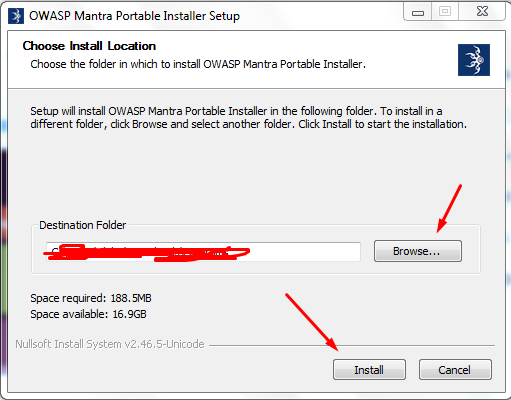
Browse Where To download And Press Install


Installation Will Start


Press Finish


Mantra Browser


Mantra is an OWASP project!

Mantra is brought to you by OWASP, a free and open software security community focusing on improving the security of software.
Our mission is to make software security visible, so that individuals and organizations worldwide can make informed decisions about true software security risks.


Monday, 9 May 2016

OGWhatsapp


Visit: GBWhatsApp 4.32


Once you install OGWhatsApp on your Android device, the app allows you to use two different telephone numbers with WhatsApp from the same smartphone.

It´s much easier to install OGWhatsApp than it might seem at first. You just have to follow these three steps:

-The first step is to make a backup copy of all of your messages (if you want to save them) and then delete all of the user information for the app (or you can just reinstall the app)

-The second step is to rename the /sdcard/WhatsApp directory to /sdcard/OGWhatsApp. You can do this using any file manager for Android, though it is easier to do this from Windows.

-The third and last step is to verify your old number in the OG version of WhatsApp, and then verify your new number in the normal version of WhatsApp. That's it.

OGWhatsApp is a very useful tool for users who want to have two WhatsApp telephone numbers on their Android device.


Visit: WhatsappMtjr v3.00 ( It's Back Again )


GBWhatsApp 4.32


Visit: ProRat (Remote Administration Tool)


Version 4.32
⚫Added more ticks total (60)
⚫Added option to add your phone number under the name in the header on main screen
⚫Enabled all types of Documents send (pdf,doc,docx,ppt,pptx,xls,xlsx,txt,xml,unknown)
⚫Added Text entry size
⚫Added more entry style total (13)
⚫Added UL Call Color
⚫Added Option to hide all atttach button in conversation
⚫Removed the poppup < visit the developer > message
⚫Support all android 2.3. And up
⚫Added Home Style:
1- WAMOD
2- Stock counter in photo
3- Telegram
4- WACA counter
5- WANH
⚫Added MOD 1.2.0 with ability to change between 13 different Text-Entry Styles Will add more in next update:
1- Default
2- Hangouts
3- WAMOD
4- Mood
5- WAMA
6- Imessage
7- WAMOD2
8- Xtreme
9- SuperMan
10- SpiderMan
11- SeachBar
12- Aran
13- Simple
⚫In-App Translator to translate messages to 8 different languages ( supports multiple messages , too )
⚫Fix Search Web image (Now directly send image)
⚫Add option 1.2.0 for custom wallpaper for each contact
⚫Added Zoom-in for profile picture
⚫Improve Lock
⚫Other Fixes


Visit: Hacking Facebook Complete E-Book

WhatsappMtjr v3.00 ( It's Back Again )


Visit: The Top 500 Worst Passwords of All Time


Whats News in 3.00

🔺Based On GBWA4.27
🔺Added more ticks total (60)
🔺Added profile photo zoom
🔺Enabled Sending All Types of Documents (pdf,doc,docx,ppt,pptx,xls,xlsx,txt,xml,unknown)
🔺Added option to add your phone number under the name in the header on main screen
🔺Added Text entry size
🔺Added more entry style total (13)
🔺Added UL Call Color
🔺Added Option to hide all atttach button in conversation
🔺Removed the poppup < visit the developer > message
🔺Support all android 2.3. And up
🔺Added Contact name in Conversation Center
🔺Added 5 Home Style
🔺Added MOD 1.2.0 with ability to change between 13 different Text-Entry Styles.


You May Also Like: What is Penetration Testing? [Ebook]


Whatsapp: Use 20+ whatsapp in one device


Its pretty simple guys just follow these simple steps and yeah all link in end of post
  1. Download the whatsapp from below give link.
  2. Install it on your device
  3. After completion verify with which ever number you wish to start whatspp
  4. okay done. If you need all 20 follow same steps for each of them.
Links:

  1. Whatsapp plus +

  2. Whatsapp plus 2 +2

  3. Whatsapp plus 3 +3

  4. Whatsapp plus 4 +4

  5. Whatsapp +A

  6. Whatsapp +B

  7. Whatsapp +D

  8. Whatsapp +E

  9. Whatsapp +F

  10. Whatsapp +G

  11. Whatsapp +H

  12. Whatsapp +I

  13. Whatsapp +K

  14. Whatsapp +L

  15. Whatsapp +M

  16. Whatsapp +N

  17. Whatsapp +R

  18. Whatsapp +S

  19. FM Whatsapp 

  20. OM Whatsapp 


Sunday, 8 May 2016

How to Unlock Android Pattern Without Losing Any Data


In these days android is popular used operating system and everybody adopting android phones. Android operating system is administered by GoogleFreshly, we discovered another trick to unlock android pattern, pin or password but a modification of that method or trick is to format all user data (losing all data). So, In this assignment, we are going to share the trick to unlock android pattern without loosing any data.

How to Unlock Android Pattern Without Losing Data

Steps to Unlock Android Pattern Without Losing Data:

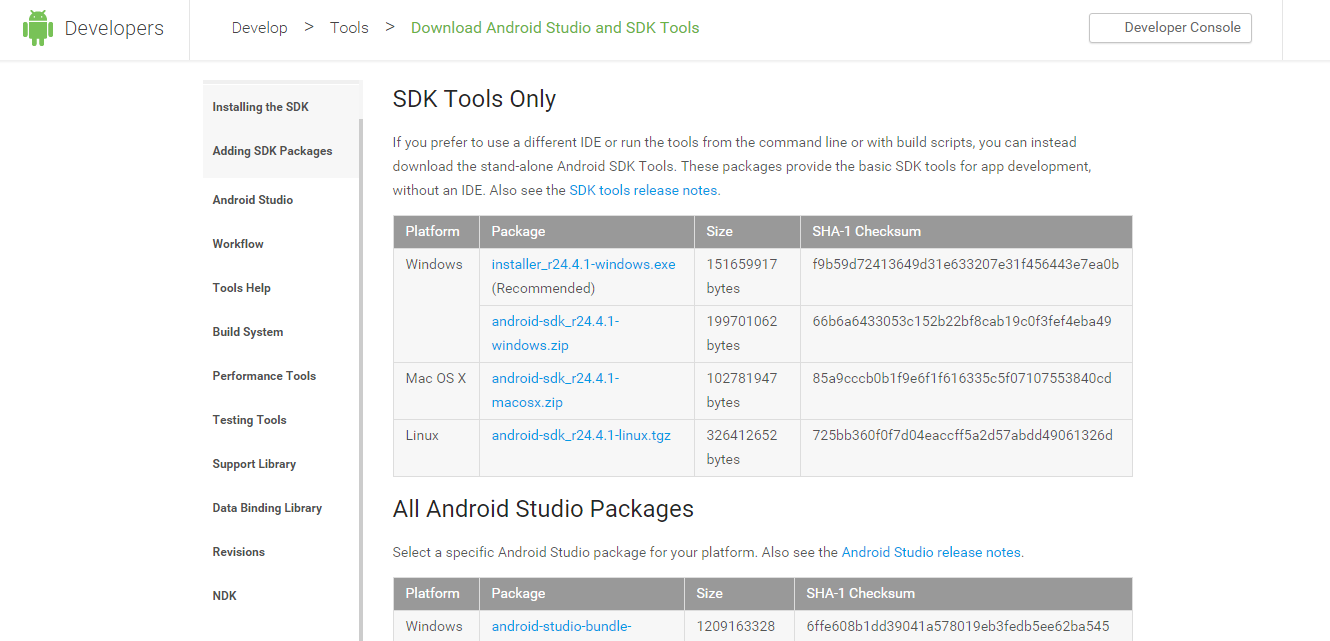
  • Download and install Android SDK Tools for run ADB commands. Now select platform according to you download and install it.
Screenshot_4
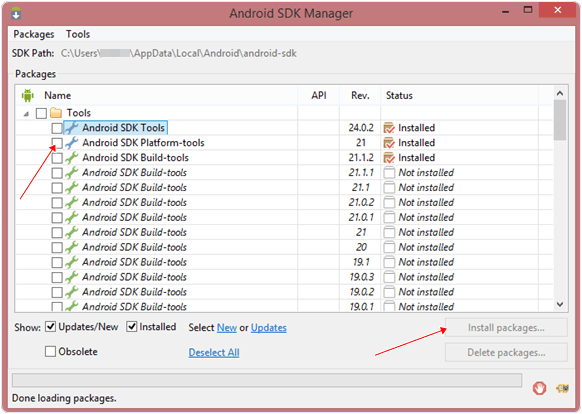
  • After installing open it, uncheck the other packages and checkAndroid SDK Platform-tools and then click on install packages according to the image given below.
install-sdk-platform-tools
So the other requirement is USB Debugging should be enabled before your android device locked.
Note:  The process will not be helpful if you don’t have specific and compatible drivers for your phone. So you should be very careful While installing your device compatible drivers.

Steps To Unlock Android Pattern Lock Without Formatting/Losing Data:

  • Connect your locked android phone with your system via USB.
  • Open folder where you installed Android SDK Tools Users > App Data > Local > Android > Android-SDK > Platform-Tools and then click on blank space hold shift and click right mouse button and select open command window here.
  • It will open you command window now you have to put some commands in the command window:-
To check whether your device is properly connected or not put command:-
adb devices

Now put these commands:-
adb shell
cd /data/data/com.android.providers.settings/databases
sqlite3 settings.db
update system set value=0 where name=’lock_pattern_autolock’;
update system set value=0 where name=’lockscreen.lockedoutpermanently’;
.quit
If above commands don’t works put:-
adb shell rm /data/system/gesture.key
4. Once you done you have to reboot your android phone. Now it’s all done.
Note: USB Debugging should be enabled before locked and it is the must. But If it is not enabled then you cannot proceed further steps.
After rebooting your device, you will see the pattern lock impaired. In this way, you will favorably unlock your Android Pattern, pin or password without formatting or losing any data. If you face any problem feel free to discuss in below comments otherwise send the email via the contact us page.

Saturday, 7 May 2016

The Top 500 Worst Passwords of All Time

This summary is not available. Please click here to view the post.


Copyright @ 2016 Elite Hackers.

Designed by Alpha